Native Swift 6.0 & SwiftUI • Universal for Apple Silicon & Intel
The physical camera notch, supercharged into your command center.
Completely invisible during normal workflows. Move your cursor to the MacBook notch to effortlessly control music, manage clipboard history, stage files for AirDrop, jot thoughts, track focus timers, and view real-time weather.
Smart Contextual Advice: Clear skies and moderate temperature. No umbrella required today.
Now☀️72°
19:00🌤️69°
20:00🌙64°
21:00✨61°
22:00☁️59°
Move cursor here to test notch ↗
NATIVE APP SNAPSHOTS
Built with AppKit, SwiftUI & Pure macOS Elegance
Adheres strictly to macOS Sonoma and Sequoia design specifications. Continuous-corner geometry matching physical display bezels, frosted acrylic glass, and zero UI clutter.
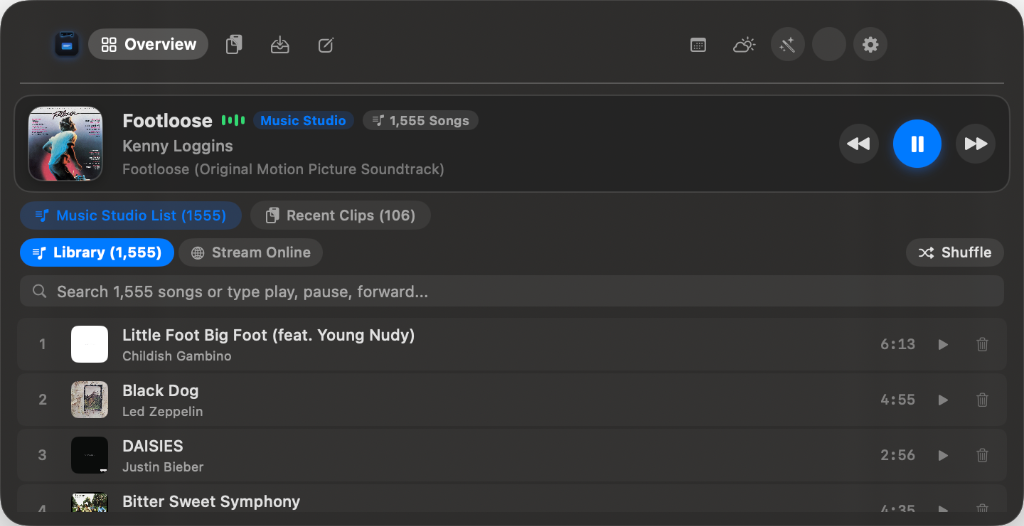
MacNotch — Universal Audio Controller & Music Studio
Live AppKit NSPanel capture • 1,555 song library • 60Hz live audio waveform • In-place pause/resume • 100% on-device
CORE CAPABILITIES
Engineered to live in the notch, ready when you need it.
Derived directly from the system architecture. Zero hardcoded display resolutions, zero process competition.
Universal Audio & Music Studio
Smart fallback chain automatically discovers active playback across Spotify, Apple Music, YouTube Music, and web browsers. Features a live 60Hz animated waveform and subtle 2-second collapsed notch glimpses upon track changes.
MediaRemoteIn-Place Resume170+ Tracks
Visual Clipboard History
Real-time pasteboard observation categorizing copied items into Links, Code snippets, Images, and Files. Built-in sensitive data shield filters out 1Password, Bitwarden, Keychain passwords, and API keys.
Drag files directly into the camera notch from Finder, Desktop, or Safari. AirDrop them to nearby devices with one click without opening cluttering Finder windows.
Drag-to-NotchInstant AirDropQuick Look
Jotter Scratchpad & Checklists
Instant floating scratchpad for rapid thoughts, meeting notes, and daily to-do checklists. Checkboxes provide interactive strike-through styling and persist across launches.
Local StorageInteractive TodosZero Delay
Focus Pomodoro & Calendar Hub
Dedicated Pomodoro countdown with 15m, 25m, and 45m presets. When collapsed, a sleek orange timer pill stays visible inside the notch. Syncs with native macOS calendars and Google Calendar secret iCal feeds.
Collapsed PillGoogle CalendarAudio Chime
Meteorological Engine & Smart Advice
Live weather conditions, feels-like temperature, hourly forecast strip, and 5-day outlook. Intelligent contextual advice alerts you when to carry an umbrella or grab a jacket. Instant °C / °F conversion.
Hourly StripUmbrella AlertsGlobal Cities
Power Tools & Vision OCR
High-DPI Screenshot Studio, screen text extraction powered by on-device Apple Vision OCR, instantaneous QR code generator, and camera mirror HUD preview.
Apple Vision OCRScreenshot StudioQR Generator
Hardware Dynamics & Backlight
Integrated screen brightness slider, volume controls, and direct keyboard backlight illumination adjustments via native Apple DisplayServices and IOKit hardware calls.
DisplayServicesKeyboard BacklightIOKit
SYSTEM ARCHITECTURE
Built Ground-Up for macOS Performance
Unlike web-wrapped or Electron utilities, MacNotch is built natively in Swift 6.0 and AppKit with zero unnecessary overhead.
Display Layer
NotchDetector & ScreenManager
Calculates dynamic geometry from NSScreen.safeAreaInsets. Multi-monitor isolation ensures cursor activation only occurs on the physical notch display.
↓
Input & State Coordinator
MouseTracker & AppState Finite State Machine
Debounced cursor monitoring (120ms activation, 350ms collapse hysteresis) prevents accidental dismissals while interacting with controls.
↓
Presentation Engine
Non-Activating Floating NSPanel
Level set to .statusBar with NSPanel activation policy. Never steals keyboard focus or disrupts full-screen IDE workflows.
🛡️
Privacy & Local-First Manifesto
MacNotch was created with zero interest in tracking you. Your clipboard, notes, and staged files are yours alone.
✓
Zero Telemetry: No analytics SDKs, error tracking beacons, or background phone-homes.
✓
100% Local Storage: Notes and clipboard cache stay safely in ~/Library/Application Support/MacNotch/.
✓
Credential Filtering: Passwords copied from 1Password, Bitwarden, or Keychain, along with API tokens (sk-..., ghp_...), are heuristically purged from clipboard history.
✓
Open Source Integrity: Every single line of code is inspectable and verifiable on GitHub.
POWER USER SHORTCUTS
Navigate at the speed of thought
Shortcut
Action
Context
⌘1
Switch to Overview & Music tab
Global in Expanded Notch
⌘2
Switch to Clipboard History
Global in Expanded Notch
⌘3
Switch to File Shelf & AirDrop
Global in Expanded Notch
⌘4
Switch to Jotter Scratchpad
Global in Expanded Notch
⌘5
Switch to Calendar & Focus Timer
Global in Expanded Notch
⌘6
Switch to Weather Forecast
Global in Expanded Notch
Space
Play / Pause active audio track
Music Studio Focused
→ / ←
Skip to next / previous track
Music Studio Focused
Clarity & Transparency
Frequently Asked Questions
Explore detailed architectural specifications, privacy guarantees, system compatibility, and design philosophy behind MacNotch.
What is MacNotch and how does it work?
MacNotch is a lightweight, privacy-first desktop utility crafted in native Swift 6.0 and SwiftUI that transforms the modern MacBook camera housing into an interactive dual-ear command center. Completely invisible during normal workflows, it smoothly expands when you move your cursor to the top center of your screen.
Which Mac models and macOS versions are supported?
MacNotch supports any Mac running macOS 14.0 (Sonoma) or macOS 15.0+ (Sequoia). It is compiled as a Universal Binary with native support for both Apple Silicon (M1, M2, M3, M4) and Intel-based Macs. It automatically adapts to notched screens (14-inch and 16-inch MacBook Pro, 13-inch and 15-inch MacBook Air) and provides a virtual top-center notch on non-notched external displays and older Mac models.
Does MacNotch steal focus from my active IDE or full-screen apps?
No. MacNotch is built using an AppKit NSPanel configured with the .nonactivatingPanel style mask at the .statusBar window level. It operates as a floating utility and never steals keyboard focus or disrupts your active IDE, terminal, or full-screen workflow.
How does hover activation work, and will it accidentally trigger while I work?
MacNotch utilizes intelligent debouncing (120ms activation delay) and hysteresis padding (350ms collapse margin) in MouseTracker.swift. This prevents accidental activation when accessing browser tabs, window title bars, or menu bar items.
How does MacNotch safeguard my privacy and data?
MacNotch is strictly 100% on-device and local-first with zero telemetry, zero analytics SDKs, and zero tracking beacons. Your clipboard history, scratchpad notes, and staged files remain encrypted in your local macOS Application Support directory and never leave your Mac.
How does the sensitive data shield protect passwords and API keys?
MacNotch's pasteboard listener heuristically detects and filters sensitive entries. Passwords copied from 1Password, Bitwarden, or Apple Keychain, along with API tokens (sk-..., ghp_...) and SSH private keys, are automatically filtered and never written to clipboard history.
How does the Universal Audio Controller coordinate with Spotify and Apple Music?
MacNotch connects to system-wide MediaRemote and native audio providers. It automatically detects active playback across Spotify, Apple Music, YouTube Music, and web browsers, offering in-place pause/resume and a 60Hz live audio waveform visualizer.
What is the 2-second Notch Glimpse?
When a track starts or advances in the background, a subtle, non-intrusive animated music pill flanks the right wing of the collapsed notch for 2 seconds and automatically dismisses without requiring cursor hover.
How does File Shelf staging and AirDrop work?
You can drag files directly from Finder, Desktop, or Safari and drop them into the notch. Staged files can be previewed with Quick Look, removed, or sent immediately to nearby Apple devices via 1-click native AirDrop without opening extra Finder windows.
How do I sync my Google Calendar or native Apple Calendar?
MacNotch seamlessly syncs with Google or Apple accounts added under macOS System Settings → Internet Accounts. Alternatively, you can paste your Google Calendar secret iCal URL (.ics) for instant schedule syncing without requiring system-wide account access.
Where does the Weather Engine fetch meteorological data?
Weather data is retrieved from high-efficiency Open-Meteo REST endpoints with aggressive in-memory caching to minimize network usage. It features live temperatures, hourly progression, a 5-day forecast, instant °C/°F conversion, and smart contextual advice like umbrella alerts.
What permissions does MacNotch require, and why?
MacNotch operates with standard user permissions. Only optional Power Tools (Screenshot Studio and Screen Text OCR) require macOS Screen Recording permission in System Settings → Privacy & Security. Stable bundle-identifier code signing ensures permissions persist across updates.
What is the memory and CPU footprint of MacNotch?
Because MacNotch is built natively in Swift 6.0 and AppKit with zero Electron or Chromium bloat, its idle memory consumption is under 38 MB RAM with virtually 0% CPU utilization when collapsed.
How do I install or uninstall MacNotch?
To install, download MacNotch.dmg, double-click to mount it, and drag MacNotch.app into your Applications folder. To uninstall, quit the app and drag MacNotch.app from Applications to your Trash.
Ready to elevate your Mac experience?
Download the universal disk image build or build from source with Xcode.